
We all learn by asking questions, but in the business IT world, people often hesitate to ask the things they genuinely want to understand. Over the years here at Clark Computer Services, I’ve noticed that employees in small and medium-sized businesses are often afraid of sounding uninformed, especially when it comes to internet and cybersecurity topics. The irony is that these are the very questions that help keep the entire organization secure, and the ones I wish people would ask far more often.
In truth, the IT industry has earned some of that hesitancy. Too many technicians get so familiar with their own terminology that they forget others don’t live in the world of acronyms, protocols, and patch cycles. But a good Managed Services Provider shouldn’t talk at you with jargon; we should make the conversation comfortable enough that you can ask anything. To get that conversation started, let’s walk through a few of the most common IT questions and explain not only what they mean, but why they matter from a cybersecurity standpoint.
What Are Cookies?
No, not the chocolate-chip kind, though those would make this explanation way more fun. Online, a cookie is simply a small piece of data that a website stores on your computer. These bits of information help websites remember who you are, what you clicked on, and how to make your next visit load a little faster.
 Internet cookies, like real cookies, come in different flavors. Some are created by the site you’re visiting to help improve your experience, while others come from outside advertisers who want to track your browsing habits. Some cookies only last as long as you keep a tab open, and others stick around for quite a while, but regardless of type, they follow you as you browse, collecting information that can be helpful, or not, depending on who’s using it.
From a business cybersecurity perspective, cookies matter because anything that tracks your activity can become a vulnerability. Third-party tracking cookies can be harvested by attackers, bundled with other data, and sold or used to guess passwords, reset security questions, or craft targeted phishing attacks. Even harmless cookies can accumulate and cause browser slowdowns, which is why periodically clearing your cache and cookies is a small but meaningful part of good cyber hygiene.
Most modern browsers now block third-party cookies by default, and most business networks tighten those restrictions even more. Still, when a website asks you to accept cookies, it’s worth pausing and remembering that each one leaves a trace. If it’s a site you trust, accepting cookies is usually fine, but if something feels off, decline them. That moment of caution contributes to the overall security of your business environment.
What Is Cache?
Cache, pronounced “cash,” like the thing we all wish we had more of, is another behind-the-scenes tool designed to make your browsing experience smoother. Your computer stores bits of websites you’ve visited, such as logos, images, and layout details, so it doesn’t need to download them again. That’s why familiar pages load quickly.
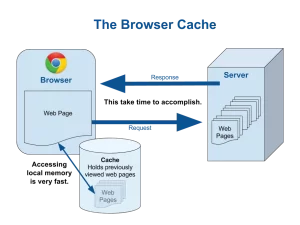 Cache issues show up when the stored information becomes outdated or corrupted. When that happens, websites suddenly look broken, load strangely, or refuse to load at all. Clearing the cache wipes out the old files so your browser can grab fresh versions.
Cache also has a cybersecurity angle. Stale or corrupted files don’t necessarily mean an attack, but they can hide one. When your browser behaves unpredictably, that’s one of the early signs IT teams look for when identifying malicious scripts or drive-by downloads. Clearing your cache is often the first troubleshooting step because it eliminates one possible cause and lets us see what’s really going on in your device. Regular cache clearing, especially on business machines, keeps browsing smooth and reduces the chance of odd behavior being mistaken for harmless clutter when it may actually signal something more serious.
Is It Okay to Use Free WiFi?
Short answer: no.
Long answer: only if you take the right precautions.
 Public WiFi in coffee shops, hotels, airports, and conference centers is convenient, but it’s also a prime hunting ground for attackers. When you connect to an open network, everything you access, including company email, internal apps, cloud storage, and web-based business tools, can potentially be monitored or intercepted. For businesses, this is a serious issue; a single login transmitted across an insecure network can result in a data breach. It only takes one employee checking email on an airport network without encryption for attackers to gain a foothold.
The good news is that using a VPN solves most of this problem. A Virtual Private Network encrypts your connection so that even if you’re on untrusted WiFi, your data travels in a secure tunnel. Many organizations now require VPN connections for any remote access, and for good reason; it’s one of the simplest ways to protect both employees and the business. When in doubt, assume free WiFi is unsafe unless you’re connected through the company VPN.
What Is Bandwidth? (And Why Does IT Keep Talking About It?)
Bandwidth is simply the amount of data your internet connection can move at once. Think of it like water flowing through a hose: the more bandwidth you have, the more water (data) you can push through in a given moment. In an office environment, bandwidth becomes important when multiple people simultaneously use cloud applications, download updates, hold video meetings, or move large files. For the performance side of the conversation, when bandwidth is limited, everything slows down for everyone.
From a cybersecurity perspective, bandwidth problems can hide malware infections. Certain types of malware consume network resources quietly in the background, making it seem like your connection is slow. Sudden dips in performance, unexplained spikes in usage, or consistently sluggish applications can be early signs of malicious activity. Understanding the basics of bandwidth helps employees recognize potential cybersecurity issues.
Please, Ask Questions
If there’s one message I’d like business teams to hear, it’s this: asking questions makes your organization safer. Whether you want to understand why the company blocks certain websites, how VPN access works, or what all these browser settings really do, we want you to ask. Every conversation increases awareness, and every bit of awareness strengthens business security.
Cybersecurity is a team effort, and the more comfortable you are asking questions, the more effective we can be at protecting you, your data, and your business. If you have any IT questions, give Clark Computer Services a call at 301-456-6931 or send an email to [email protected] and see why we are simply the Best Choice in IT Support Services.